Real-time planning
Real-time planning handles a planning problem where the problem facts keep changing while the solver is running. It combines continuous planning with short planning windows to keep the solution current as the world changes around it.
Consider the vehicle routing use case:
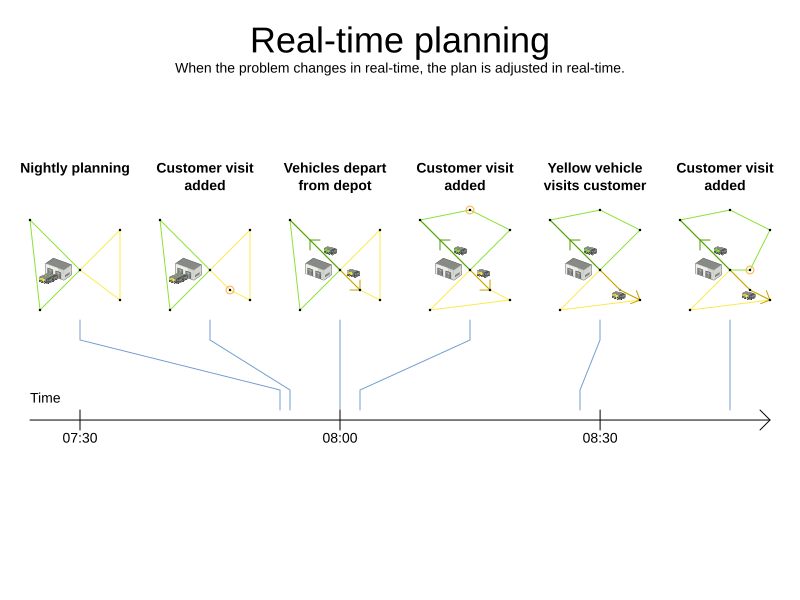
Three customers are added at different times (07:56, 08:02, and 08:45), after the original customer set finished solving at 07:55 — in some cases after vehicles have already left.
Timefold Solver handles this with ProblemChange, used together with pinned planning entities.
1. ProblemChange
While the Solver is solving, an outside event may change a problem fact or planning entity — for example, an airplane is delayed and needs the runway at a later time.
|
Do not change the problem fact instances used by the |
Instead, submit a ProblemChange to the solver, which it applies in the solver thread as soon as possible:
-
Java
public interface Solver<Solution_> {

    ...

    void addProblemChange(ProblemChange<Solution_> problemChange);

    boolean isEveryProblemChangeProcessed();

    ...

}
You can also submit a ProblemChange via SolverManager:
-
Java
public interface SolverManager<Solution_, ProblemId_> {

    ...

    CompletableFuture<Void> addProblemChange(ProblemId_ problemId, ProblemChange<Solution_> problemChange);

    ...

}
or via SolverJob:
-
Java
public interface SolverJob<Solution_, ProblemId_> {

    ...

    CompletableFuture<Void> addProblemChange(ProblemChange<Solution_> problemChange);

    ...

}
The returned CompletableFuture<Void> completes when a user-defined Consumer accepts the best solution that includes this problem change.
The ProblemChange interface itself is:
-
Java
public interface ProblemChange<Solution_> {

    void doChange(Solution_ workingSolution, ProblemChangeDirector problemChangeDirector);

}|
The |
1.1. Writing a ProblemChange correctly
To write a ProblemChange correctly, you need to understand the behavior of a planning clone.
A planning clone must fulfill these requirements:
-
It represents the same planning problem — usually by reusing the same problem fact instances and collections.
-
It uses different, cloned instances of entities and entity collections — changes to the original solution’s entity variables must not affect the clone.
When implementing a ProblemChange, follow these rules:
-
Make every change on the
@PlanningSolutioninstance passed todoChange(). -
The
workingSolutionis a planning clone of theBestSolutionChangedEvent’s `bestSolution.-
The
workingSolutioninside the solver is never the same instance as in your application. -
Entity collections are cloned, so changes to planning entities must happen on the
workingSolutioninstance passed todoChange().
-
-
Use
ProblemChangeDirector.lookUpWorkingObject()to retrieve the working solution’s version of any object. This requires annotating a property with@PlanningId. -
Problem facts and problem fact collections are not cloned. The
workingSolutionandbestSolutionshare the same problem fact instances.Any problem fact or collection changed by a
ProblemChangemust be problem-cloned first (which may require rerouting references in other facts and entities). Otherwise a race condition can occur when the solver thread and a GUI thread access the same instance simultaneously. -
For performance, submit multiple changes at once using
addProblemChanges(List<ProblemChange>)rather than callingaddProblemChange()repeatedly.
1.2. Cloning solutions to avoid race conditions
Many types of changes can leave a planning entity uninitialized, producing a partially initialized solution. This is acceptable as long as the first solver phase can handle it — all construction heuristic phases can, so configure one as the first phase.
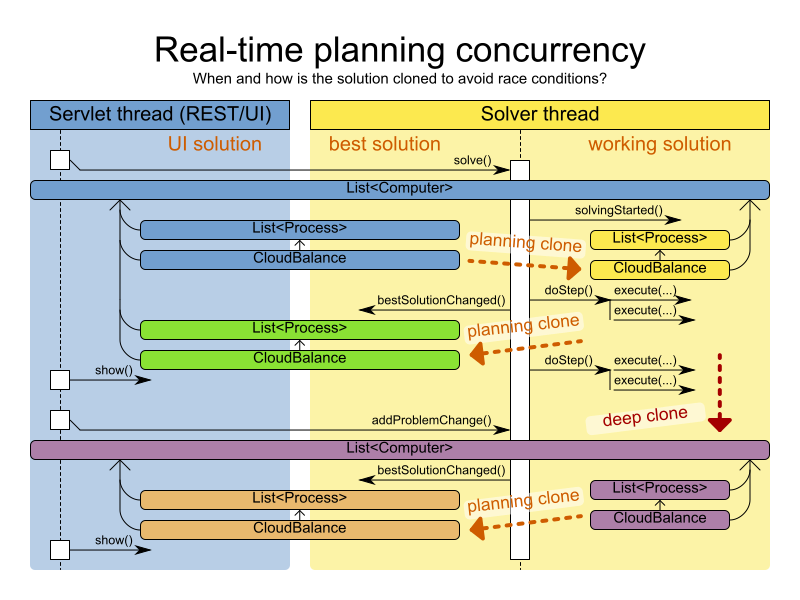
When a ProblemChange is submitted, the solver:
-
Stops.
-
Applies the
ProblemChange. -
Restarts from the adjusted best solution (warm start — much faster than a cold start).
-
Runs each solver phase again. The construction heuristic re-runs, but finishes quickly because few or no variables are uninitialized.
-
Resets each configured
Termination(both solver and phase), but does not undo a priorterminateEarly()call.Terminationis usually not configured in real-time planning; instead callSolver.terminateEarly()when results are needed. Alternatively, configure aTerminationand use daemon mode together withBestSolutionChangedEventas described below.
2. Daemon: solve() does not return
In real-time planning it is often useful for the solver thread to wait when it runs out of work, and immediately resume when new problem changes arrive. Daemon mode enables this:
-
When
Terminationtriggers, the solver does not return fromsolve()— it blocks the thread and frees CPU.-
terminateEarly()is the exception: it does make the solver return, freeing system resources and allowing a graceful shutdown. -
If the solver starts with an empty planning entity collection, it enters the blocked state immediately.
-
-
When a
ProblemChangeis submitted, the solver resumes, applies the change, and continues solving.
To enable daemon mode:
-
Set
<daemon>true</daemon>in the solver configuration:<solver xmlns="https://timefold.ai/xsd/solver" xmlns:xsi="http://www.w3.org/2001/XMLSchema-instance" xsi:schemaLocation="https://timefold.ai/xsd/solver https://timefold.ai/xsd/solver/solver.xsd"> <daemon>true</daemon> ... </solver>Always call
Solver.terminateEarly()when your application shuts down to avoid killing the solver thread unnaturally. -
Subscribe to
BestSolutionChangedEventto receive new best solutions from the solver thread.A
BestSolutionChangedEventdoes not guarantee that everyProblemChangehas been processed, or that the solution is initialized and feasible. -
Filter out invalid solutions:
-
Java
public void bestSolutionChanged(BestSolutionChangedEvent<VehicleRoutePlan> event) { if (event.isEveryProblemChangeProcessed() // Ignore infeasible (including uninitialized) solutions && event.getNewBestSolution().getScore().isFeasible()) { ... } } -
-
Use
isNewBestSolutionInitialized()instead ofScore.isFeasible()if you want to accept infeasible solutions but still reject uninitialized ones.